 Speed Comp
Volume that keeps up with the wind
Open the throttle and the wind takes your music with it. Speed Comp raises your Bluetooth volume as you speed up and eases it back as you slow — so you keep your hands where they belong instead of on the volume button.
If it moves, it works — boats, jet skis, motorcycles, ATVs, golf carts, snowmobiles, and whatever else you ride. Free, no account.
The faster you go, the less you hear
Wind and engine noise climb with speed. The volume that was perfect at the dock is gone by the time you are on plane, and turning it up by hand means letting go of something.
Set it once, at a standstill
Pick a volume that sounds right while stopped. That is the floor, and the app never goes below it.
It climbs with you
From your start speed to your top speed the volume rises steadily — no lurches, no surprises, and on Pro no audible steps at all.
It settles when you do
Throttle back and the volume comes back down to exactly where you left it, so you are not shouting over the speaker at idle.
Three moving parts
Set a speed range, start compensation, and go. Everything after that is automatic.
Pick your range
Choose the speed where compensation should start and the speed where it should top out — in MPH or KPH. Below your minimum, the app leaves your volume alone entirely.
Set your baseline
Tap start at a volume that sounds right while stopped. That level becomes the floor. Speed Comp only ever adds to it — it will never turn your music down below where you set it.
Ride
GPS speed drives the volume curve continuously in the background, screen off. A Live Activity on iPhone, or an ongoing notification on Android, shows it running — with a stop button always one tap away.
Built for the way audio actually works
The details that separate this from stabbing the volume button with a wet thumb.
Smooth, not steppy Pro
A phone's volume moves in about fifteen or sixteen discrete steps. Pro fills the gaps between them, so the volume glides instead of jumping from one step to the next. On Android, open Speed Comp before your music app — the effect attaches to the audio session as that app starts it.
Works with your player
Spotify, YouTube Music, Pandora, Amazon Music, Audible, podcasts — Speed Comp moves the volume your player already uses, so anything that plays follows along. No per-app allowlist to maintain, no favourites left out.
A profile per ride Plus & Pro
A bowrider and a motorcycle need different curves, and so does whatever you take out next. Save a named profile for each and switch between them without redialling anything. Plus keeps three; Pro keeps as many as you like.
Try it parked
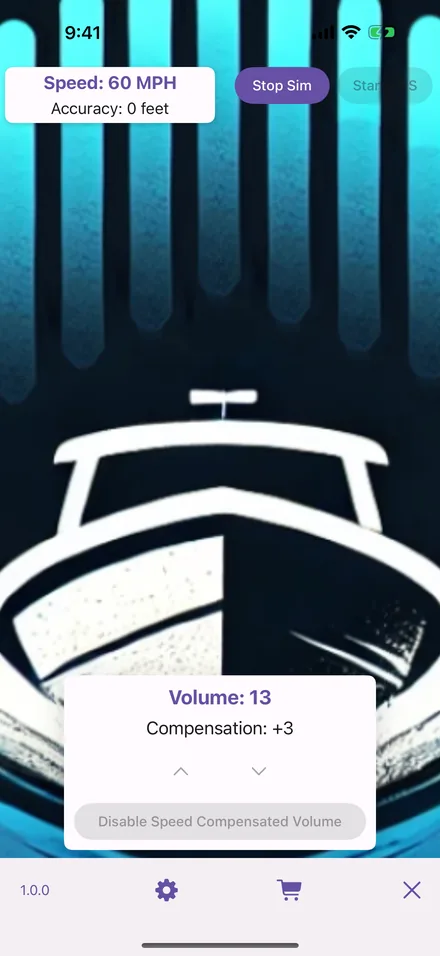
A built-in simulation ramps a fake speed from a standstill to your maximum, through the exact same code path as real GPS. Dial your curve in at the dock or in the garage, not at thirty knots.
Now playing at a glance Pro
Track, artist and album art on the main screen, with transport controls, so you are not digging through apps with the engine running. On Android the card follows whatever app is playing; on iPhone it shows Apple Music.
Your speed stays yours
Location is read on your phone, turned into a volume level on your phone, and never leaves it. No tracking, no advertising, no location history.
If it moves, it works
Nothing in the app is vehicle-specific — it reads speed and sets volume. These are the rides it was built with in mind, each with its own page on where to set the range.
Where your data goes
Speed Comp needs precise location because that is the only way a phone knows how fast you are moving. It does not follow that the app needs to keep it, and it does not.
- Your location never leaves your device — not to us, not to anyone. Speed is read, turned into a volume, and discarded; the one figure that leaves is a session's highest speed, in the analytics below.
- No location history is stored, not even locally.
- No ads, no advertising ID, no tracking.
- Anonymous usage analytics only, through Google Analytics for Firebase — which screens are opened and whether a session or a purchase went through — under its random app-instance id, with no location readings in it. The policy lists every event.
- No account to create. We never ask for your name or email to use the app.
- On iPhone, Apple handles purchases on the device and the app talks to no server of ours at all.
- On Android, purchases are verified against Google Play through our server — that is the only thing the app ever sends to us.
Free to use, for as long as you like
Speed compensation is not a trial and does not expire. The only limit without a subscription is that each session runs for up to two hours, then stops — start it again and you get another two. A subscription lifts that limit and adds the extras below.
Free
No account, no ads, no expiry date.
- Full speed-to-volume compensation
- Two hours per session, restart as often as you like
- Speed simulation for tuning while stopped
Plus
Everything in Free, without the session clock.
- No session time limit
- Up to three saved profiles
Pro
Everything in Plus, plus the audio extras.
- Unlimited saved profiles
- Smooth gain between volume steps
- Now-playing display with transport controls (Apple Music on iPhone)
The only price that is right for you is the one on the subscription screen inside the app. The App Store or Google Play quotes it for your country and your account, including any introductory offer you qualify for, so a number printed here — or the range a store listing shows — can easily not be the number you would actually pay. Billing, renewals and refunds are handled entirely by Apple or Google; manage or cancel any time under Subscriptions in your Apple Account settings or your Google Play account.


Where it works, and where it doesn't
Worth knowing before you install, rather than after.
Built for
Your phone driving a Bluetooth speaker, a helmet headset or headphones. The vehicle does not matter — what matters is that you are the one setting the volume, and that wind is what you are fighting.
Not really for
Newer cars. A modern stereo tends to manage its own volume, and many already adjust for road noise on their own, so there is little left for Speed Comp to do. This is built for the boat and the bike, not the daily driver.
Questions people ask
What does Speed Comp actually do?
It reads your speed from GPS and raises your phone's media volume as you go faster, then eases it back down as you slow. You set the speed where it starts and the speed where it tops out; between the two the volume climbs steadily. Below your start speed it leaves the volume alone.
Is it free?
Yes. Speed compensation itself is free and never expires — it is not a trial. Without a subscription each session runs for up to two hours and then stops; start it again and you get another two. Plus removes that limit and adds saved profiles; Pro adds unlimited profiles, a smooth glide between volume steps, and a now-playing card.
Does it work with Spotify, podcasts, audiobooks, YouTube Music?
Yes, with all of them. Speed Comp moves the phone's media volume — the same one the side buttons move — so whatever is playing follows along. There is no per-app list to maintain.
Does it work with my Bluetooth speaker or helmet headset?
If your phone is what you set the volume on, yes. The app changes the volume your phone sends out, so a Bluetooth speaker, a helmet headset, earbuds or a wired connection all follow. A device with its own volume control still receives the change — the phone adjusts the level it sends before the device applies its own.
Will it ever turn my music down below where I set it?
No. The volume you have when you start compensation is the floor. Speed Comp only ever adds to it, and comes back to exactly that level when you stop moving.
How do I test it without going out?
Turn on simulation settings in the app, then tap Start Sim on the home screen. A fake speed ramps from a standstill to your maximum through exactly the same code path as real GPS, so what you hear at the dock or in the garage is what you will hear on the water or the trail.
Support
Bring a bug, a setup that will not behave, or a vehicle nobody has tried yet. The Discord is the quickest way to reach us, and email works just as well. It is a small server and early — which means the person who wrote the app is the one reading it.
Turn it on before your next ride
Free on iPhone and Android. Set a range, set a baseline, and stop reaching for the volume.