 Speed Comp
Music that keeps up with the cart
A cart speaker set for the path is too loud on the tee, and a speaker set for the tee is inaudible with the wind in your face. Speed Comp reads your GPS speed and raises the volume as you roll, then settles it back as you pull up to the ball.
A clip-on speaker, the cart's own Bluetooth stereo, on the course or around the neighbourhood in a street-legal cart.
Loud on the path, quiet at the ball
Every hole is the same routine: turn it down for the shot, back up for the drive. The app does that part.
Settles at every stop
The volume drops back to your baseline each time you stop, so nobody is reaching for the speaker before a shot.
Both hands free
No phone-poking between shots. The app runs in the background with the phone in the cupholder, screen off.
Around the neighbourhood too
Street-legal carts and LSVs cruising at 20–25 mph get the same treatment: quiet at the mailbox, up with the wind.
Three moving parts
Set a speed range, start compensation, and go. Everything after that is automatic.
Pick your range
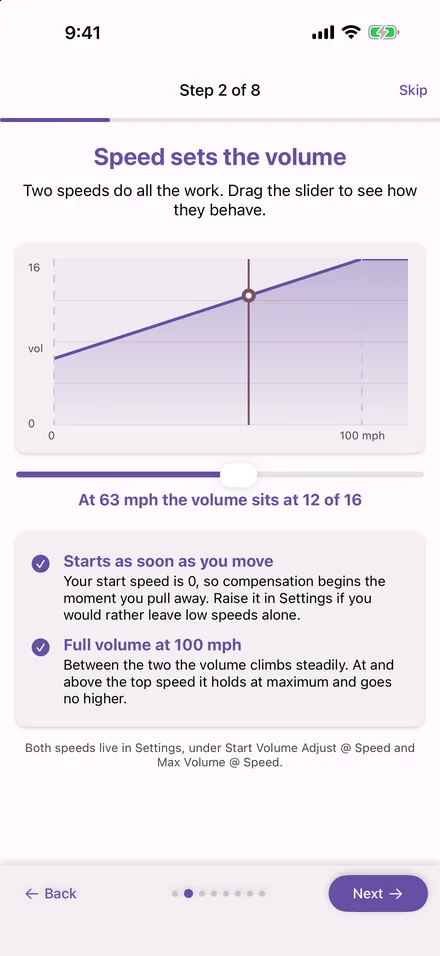
Choose the speed where compensation should start and the speed where it should top out — in MPH or KPH. Below your minimum, the app leaves your volume alone entirely. In a cart, try starting at about 5 mph and topping out at 15–20 mph — cart speeds are low, so the whole ramp fits inside them.
Set your baseline
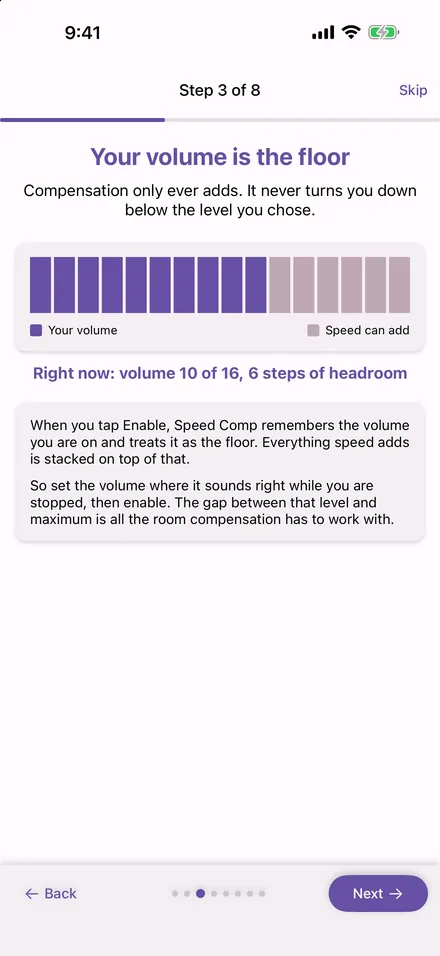
Tap start at a volume that sounds right while stopped. That level becomes the floor. Speed Comp only ever adds to it — it will never turn your music down below where you set it.
Ride
GPS speed drives the volume curve continuously in the background, screen off. A Live Activity on iPhone, or an ongoing notification on Android, shows it running — with a stop button always one tap away.
Set up for the course
A clip-on speaker or the cart's stereo
If it plays from your phone over Bluetooth, Speed Comp moves the level the phone sends it. The speaker's own volume applies on top.
Keep it neighbourly
Set the baseline at a level that is fine for the tee, and let the app add only what the wind takes away on the path. It always comes back to that baseline when you stop.
One profile for the course, one for the street
Different top speeds, different curves. Plus keeps three saved profiles; Pro keeps as many as you like.
What it looks like
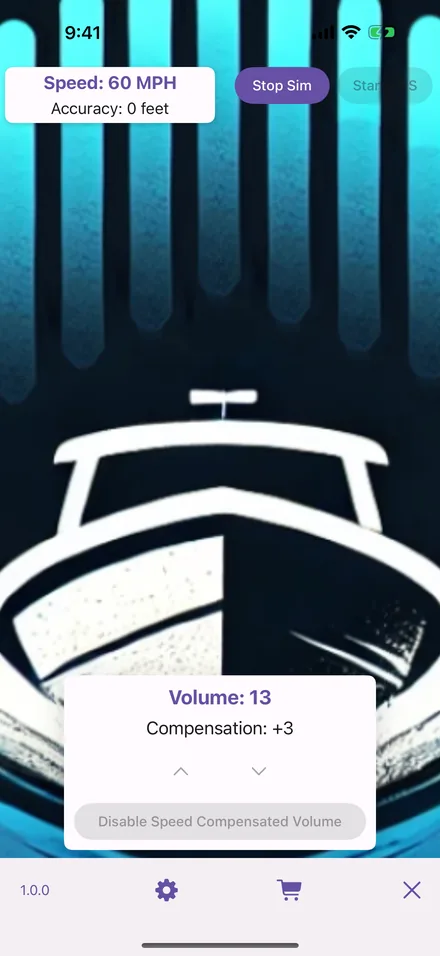
The same app on iPhone and Android: a speed, a volume, and how much the app has added.
Running
Speed, volume and the amount added, with a stop button.
The curve
Two speeds do all the work; between them the volume climbs steadily.
The floor
Your starting volume is the floor. The app only ever adds to it.
Free to use, for as long as you like
Speed compensation is not a trial and does not expire. The only limit without a subscription is that each session runs for up to two hours, then stops — start it again and you get another two. A subscription lifts that limit and adds the extras below.
Free
No account, no ads, no expiry date.
- Full speed-to-volume compensation
- Two hours per session, restart as often as you like
- Speed simulation for tuning while stopped
Plus
Everything in Free, without the session clock.
- No session time limit
- Up to three saved profiles
Pro
Everything in Plus, plus the audio extras.
- Unlimited saved profiles
- Smooth gain between volume steps
- Now-playing display with transport controls (Apple Music on iPhone)
Where your data goes
Speed Comp needs precise location because that is the only way a phone knows how fast you are moving. It does not follow that the app needs to keep it, and it does not.
- Your location never leaves your device. Speed is read, turned into a volume, and discarded; no location history is kept, not even on the phone.
- No ads, no advertising ID, no tracking, no account.
- Anonymous usage analytics only — which screens are opened, whether a session or a purchase went through. The policy lists every event.
Questions from the course
Cart speeds are low — does it still make a difference?
The range is yours to set. With a start of 5 mph and a top of 18, the whole volume ramp happens across cart speeds — the app does not care how fast the top is, only that you are between the two numbers you chose.
Does it work with a clip-on cart speaker?
If your phone is what plays the music, yes. Speed Comp moves the phone's media volume — the level your phone sends over Bluetooth — so any speaker, headset or built-in audio system that is playing from your phone follows along. A device with its own volume knob applies that on top: leave it where you like it and let the phone's level do the moving. What the app cannot reach is a stereo playing its own source, such as FM radio or a USB stick.
Will it keep running with the phone in the cupholder?
Yes. On iPhone the app keeps receiving location in the background and shows a Live Activity on the Lock Screen with a Stop button; on Android it runs as a foreground service with an ongoing notification, also with Stop. Screen off, phone sealed away — it keeps working.
Will it ever turn my music down below where I set it?
No. The volume you have when you start compensation is the floor. Speed Comp only ever adds to it, and comes back to exactly that level when you stop moving.
How do I cancel?
Through the store, not through us. On iPhone: Settings › your Apple Account › Subscriptions. On Android: the Google Play app › your profile › Payments & subscriptions. Cancelling keeps the tier until the end of the period you paid for.
Set it once, on the first tee
Free on iPhone and Android. Pick a range, set a baseline, and forget the speaker for eighteen holes.